
-850x450.png)
IP Camera vs Analog (HD) CCTV: Which Security System Is Right for Your Home or Shop in Bangladesh?
Analog HD cameras send video down a coaxial cable to a DVR. IP cameras turn video into network data and send it over an Ethernet cable to an NVR. Both can give you clear 1080p or better footage, but they differ in cabling, picture detail, smart features, expansion and how they cope with power cuts. This guide explains every difference in plain language, so you can choose the right system for a flat, a shop, a school or a small office.
The short answer
If you are installing a small system of four to eight cameras for a flat or shop and you want the simplest setup, an analog HD system with a DVR is still a sensible choice. It is easy to install, easy to repair, and works well at 1080p resolution.
If you want sharper footage that lets you read faces and number plates more easily, plan to add more cameras later, or want features such as built-in microphones, smart motion detection and easier remote viewing, an IP system with an NVR is the better long-term investment.
Many buyers end up somewhere in between. Some modern DVRs accept a few IP cameras alongside analog ones, so you can start with analog and add IP cameras later without replacing the recorder.
How an analog HD CCTV system works
An analog HD camera captures the image and sends it as an analog video signal along a coaxial cable to a DVR (Digital Video Recorder). The DVR does the hard work: it converts the signal to digital, compresses it, records it to a hard disk and makes it available on your phone through the brand's app.
Older CCTV cameras were limited to very low resolution, but modern analog HD standards such as HD-TVI, HD-CVI and AHD carry 1080p and higher over the same type of coaxial cable. That is why you will see cameras described as "Turbo HD" (Hikvision's name for HD-TVI) or "HDCVI" (Dahua's name).
Each analog camera needs two things: a video cable to the DVR and a power supply. In most installations, a combined "siamese" cable carries the coaxial video line and a pair of power wires together, connected to a central 12V power supply box.
Key parts of an analog system
- Analog HD cameras: bullet, dome or turret shapes, usually 2MP (1080p) for home and shop use.
- DVR: the recorder that turns the camera signal into digital video. You can browse options on the DVR page.
- Coaxial cable with power wires: one run from each camera back to the DVR.
- 12V power supply: a central box or individual adapters.
- Hard disk: inside the DVR, usually a surveillance-grade drive.
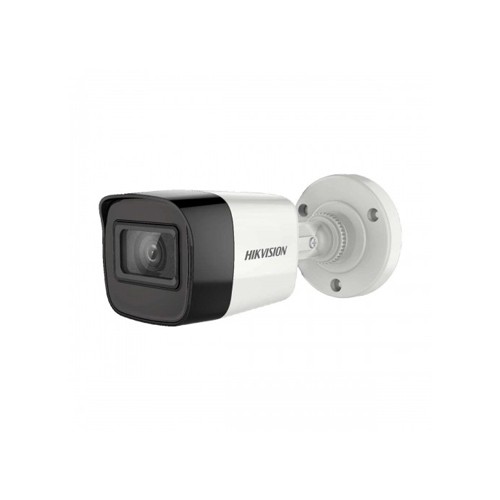
A good example of a modern analog camera is the HikVision DS-2CE16D0T-ITPFS 2MP Audio Fixed Mini Bullet Camera, which lists a 1920 × 1080 resolution, up to 25 m of IR night vision, and a switchable 4-in-1 output (TVI, AHD, CVI and CVBS), so it can work with DVRs from different standards.
How an IP camera system works
An IP (Internet Protocol) camera is a small computer with a lens. It captures the image, compresses it inside the camera and sends it as network data over an Ethernet cable. The recorder, called an NVR (Network Video Recorder), receives that data and stores it on a hard disk.
The big practical advantage is PoE (Power over Ethernet). With a PoE NVR or a PoE switch, one Ethernet cable carries both power and video to each camera, so you do not need a separate power supply or power wires at the camera position. The IEEE 802.3af PoE standard used by most small cameras delivers enough power for a typical bullet or dome camera.
Because each IP camera processes its own image, IP systems usually offer higher resolution and more features at the camera level, such as built-in microphones, smart detection of people and vehicles, and wider dynamic range for scenes with bright windows or headlights.
Key parts of an IP system
- IP cameras: commonly 2MP to 4MP for homes and shops, higher for large sites.
- NVR: the recorder for network cameras. See the NVR range.
- Cat6 Ethernet cable: one run per camera, up to 100 m.
- PoE: built into many NVRs, or provided by a separate PoE switch.
- Hard disk: inside the NVR.
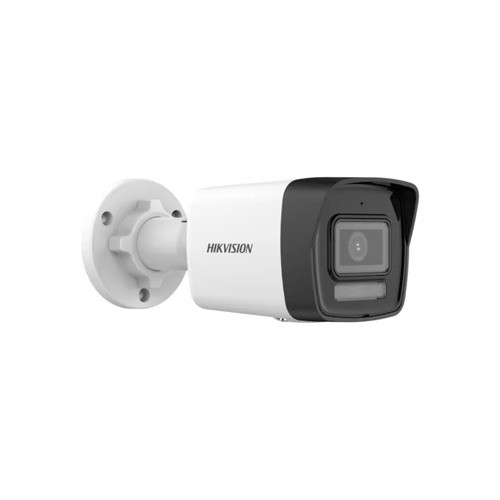
The Hikvision DS-2CD1043G2-LIU 4MP Smart Hybrid Light Bullet IP Camera is a typical example: it lists a 2560 × 1440 resolution, an F1.6 lens and up to 50 m of IR range. That is noticeably more detail than a 1080p analog camera covering the same area.
IP vs analog CCTV: side-by-side comparison
| Feature | Analog HD (DVR) | IP (NVR) |
|---|---|---|
| Cable | Coaxial cable plus power wires | Cat6 Ethernet, power over the same cable with PoE |
| Typical resolution | 2MP (1080p), some models higher | 2MP to 4MP common, higher models available |
| Cable distance | Long runs over good coaxial cable | 100 m per Ethernet run, longer with a switch in between |
| Where video is processed | In the DVR | In each camera |
| Smart features | Basic on most models, AcuSense on some DVRs | Wider choice of smart detection, audio and analytics |
| Installation | Simple, familiar to most technicians | Needs basic network setup |
| Expansion | Limited by DVR channels | Easy to add cameras with switches and larger NVRs |
| Upfront cost | Usually lower for small systems | Usually higher per camera |
| Best for | Small homes and shops on a budget, upgrading old coaxial systems | Shops, offices, schools and anyone who wants more detail |
Picture quality: what the megapixel numbers really mean
A 2MP camera records 1920 × 1080 pixels. A 4MP camera usually records 2560 × 1440, which is almost twice as many pixels. More pixels let you zoom into recorded footage and still recognise a face or read text, which is exactly what you need after an incident.
Resolution is not the whole story, though. The lens, the image sensor and the compression all affect how usable the picture is. A well-placed 2MP camera covering a narrow doorway can identify faces better than a 4MP camera covering an entire car park.
A simple way to choose resolution
- Corridors, staircases and small rooms: 2MP is usually enough.
- Shop counters and entrances where you need to identify faces: 4MP gives you more room to zoom.
- Wide areas such as gates, parking or warehouses: choose 4MP or higher, or add a second camera closer to the point of interest.
Because IP cameras commonly start at 2MP and move up to 4MP without changing the recorder type, they are the easier route if detail matters to you.
Night vision and colour at night
Most cameras use infrared (IR) LEDs to see in the dark. IR footage is black and white, which is fine for detecting movement but loses the colour of clothes and vehicles.
Both analog and IP ranges now include colour night vision models. Hikvision calls this ColorVu: a very bright lens plus a soft warm light lets the camera keep colour at night. Examples include the Hikvision DS-2CE72DF3T-F 2MP ColorVu Fixed Turret Camera on the analog side, which lists an F1.0 aperture and up to 40 m of white light, and the Hikvision DS-2CD1347G0-L 4MP ColorVu PoE IP Dome Camera on the IP side, which lists an F1.0 lens and up to 30 m of light range.
Smart Hybrid Light cameras switch between IR and white light. They stay in black and white mode most of the night and turn on the white light only when they detect a person or vehicle, which gives you colour evidence without lighting up the area all night.
IR night vision
Black and white footage, invisible light, good for detecting movement. Best for bedrooms, quiet corners and places where a visible light would disturb people.
Colour night vision
Colour footage after dark with a visible warm light. Best for gates, parking areas and shop fronts where clothing and vehicle colour matter.
Cabling and installation in Bangladeshi buildings
Cabling is often the biggest part of the job, especially in finished flats where you do not want to break walls. Here the two systems behave differently.
Analog cabling
Coaxial cable is thick and less flexible, but it runs long distances without extra equipment. If your building already has coaxial cable from an older CCTV system, you can often reuse it with new HD cameras and a new DVR, which saves a lot of work.
IP cabling
Cat6 cable is thinner and easier to route through existing conduits. Each run can be up to 100 m. For longer distances, you add a PoE switch in between, which also lets you connect several cameras from one area with a single cable back to the NVR.
Tips that apply to both
- Use outdoor-rated cable for any section exposed to sun and rain, and protect joints with proper junction boxes.
- Keep camera cables away from electrical wiring to reduce interference.
- Mount outdoor cameras under a shade or overhang where possible. Heavy monsoon rain and direct sun shorten the life of any camera.
- Label every cable at both ends. It saves hours when you need to fix a camera later.
DVR or NVR: choosing the recorder
The recorder decides how many cameras you can connect, which resolution you can record and how many hard disks you can use.
For a small analog system, the Hikvision DS-7104HGHI-K1 4 Channel DVR lists support for H.265 Pro+ compression and IP video input of 1 channel (up to 5 channels), which means it can also accept IP cameras alongside the analog ones. That is a useful bridge if you want to move to IP gradually.
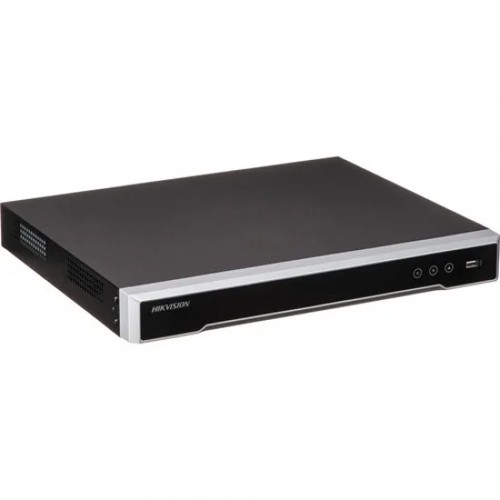
For IP cameras, the Hikvision DS-7104NI-Q1/M 4 Channel NVR lists 4 IP channels up to 4MP with one SATA hard disk. If you want power over Ethernet built in, the Hikvision DS-7604NI-K1/4P Plug and Play 4K NVR has PoE ports, so cameras can be plugged straight into the recorder. For larger sites, the Hikvision DS-7608NI-Q2 8-Channel 4K NVR lists two SATA bays with up to 8 TB per disk.
Plan channels with room to grow
Count the cameras you need today, then add at least one or two spare channels. A 4-camera home system on a 4-channel recorder has no room for a new gate camera later. An 8-channel recorder costs a little more but saves you from replacing the whole recorder.
The hard disk matters too. For a detailed look at how many days of recording you get from each drive size, read our CCTV hard disk storage guide.
Smart features and remote viewing
Both systems let you watch live and recorded footage on your phone through the brand's app, such as Hik-Connect for Hikvision. The difference is in how intelligent the alerts are.
Basic motion detection reacts to any change in the picture, including moving tree branches, headlights and rain. That leads to many false alerts. Smart detection uses analytics to recognise people and vehicles, so you only get notified when it matters. Hikvision's AcuSense feature is one example and is available on some IP cameras and on selected DVRs, such as the Hikvision iDS-7108HQHI-M1-S 8 Channel AcuSense DVR.
IP cameras also make it easier to add built-in microphones, two-way audio and higher frame rates. If you run a shop and want to hear what happens at the counter, or speak to a delivery person at the gate, an IP system gives you more choice.
Power cuts and load-shedding
A security system that switches off during a power cut is not much use. In Bangladesh, plan for backup power from the start.
- Analog systems: the DVR and the 12V camera power supply both need backup. Connect both to a UPS.
- IP systems with PoE: the NVR or PoE switch powers the cameras, so backing up that one device keeps everything running.
- Router and ONU: if you want to keep watching remotely during a power cut, the router and ONU also need backup. A mini DC UPS is a neat solution for these.
Browse backup options on the UPS page, and read our online vs offline UPS guide to size one correctly.
Which system suits your situation?
| Situation | Recommended system | Why |
|---|---|---|
| Flat with 2 to 4 cameras, simple needs | Analog HD with a 4 or 8-channel DVR | Easy to install, 1080p is enough for corridors and doors |
| Small shop with a counter and entrance | IP with a PoE NVR | More detail for faces, audio at the counter, fewer cables |
| Building with existing coaxial cable | Analog HD, or a DVR that accepts some IP cameras | Reuse the cables and upgrade gradually |
| Office, school or warehouse | IP with an 8 or 16-channel NVR | Easier expansion and smarter alerts |
| Gate and parking area | 4MP ColorVu or Smart Hybrid Light camera, IP or analog | Colour evidence of vehicles and people at night |
Common mistakes to avoid
- Mixing standards without checking: not every analog camera works with every DVR. Check the output (TVI, CVI, AHD) and the DVR's supported inputs.
- Choosing too few channels: leave space for at least one or two more cameras.
- Using a normal desktop hard disk: surveillance drives are built to record all day, every day.
- Pointing cameras at bright light: a camera facing a sunny door or street lights will show dark faces. Change the angle or choose a model with WDR.
- Ignoring privacy: do not point cameras into neighbours' windows, washrooms or changing areas.
- Skipping backup power: plan a UPS for the recorder, cameras and router from day one.
- Keeping the default password: set a strong password on the recorder and the app account.
Final verdict
Analog HD CCTV is still a reliable, practical choice for small, simple systems and for buildings that already have coaxial cable. IP cameras cost a little more at the start but give you sharper footage, smarter alerts, built-in audio and easier expansion. If you are unsure, a DVR that also accepts IP cameras lets you start with analog and move to IP step by step.
Compare cameras and recorders on our IP camera, HD camera and security pages, or ask the Index IT team to help you plan the right number of cameras and channels.
Frequently Asked Questions
Is an IP camera better than an analog CCTV camera?
For picture detail, smart features and expansion, yes. For a small, simple 1080p system, analog HD cameras with a DVR are still a practical and reliable choice.
Can I connect an IP camera to a DVR?
Only if the DVR supports IP input. Some hybrid DVRs, such as the Hikvision DS-7104HGHI-K1, list a small number of IP channels in addition to the analog inputs.
Can I use my old CCTV cables with new cameras?
Usually yes, if they are coaxial cables in good condition. New analog HD cameras and a new DVR can often reuse them. IP cameras need Ethernet cable instead.
What is PoE in CCTV?
Power over Ethernet sends power and data through one Ethernet cable, so an IP camera does not need a separate power adapter at its location.
How far can an IP camera be from the NVR?
Up to 100 m on one Ethernet cable. For longer distances, place a PoE switch in between.
Do IP cameras need internet to work?
No. They record to the NVR over your local network. Internet is only needed to watch footage remotely on your phone.
What does Turbo HD mean?
Turbo HD is Hikvision's name for its HD-TVI analog HD technology, which sends high-definition video over coaxial cable.
Is 2MP enough for a home CCTV camera?
For corridors, stairs and doors, 2MP is usually enough. For wide areas or places where you need to identify faces from further away, 4MP is a better choice.
Which is better at night, IP or analog?
Both can perform well. Night quality depends on the model, so look for ColorVu or Smart Hybrid Light features if you want colour footage after dark.
Will my CCTV work during load-shedding?
Only if the recorder, cameras and router are connected to a UPS. Plan backup power when you design the system.

There are no comments for this Article.