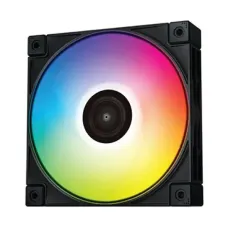
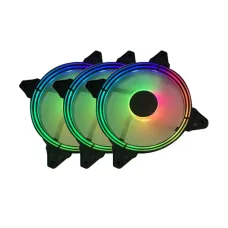
Casing Fan Price in Bangladesh
Does your PC get hot and loud while gaming or rendering? The right casing fans cool it down and quiet it too.
This page covers casing fan price in Bangladesh with a buying guide. We explain sizes, airflow, connectors, RGB and setup. Then you choose fans that fit your case.
What Is a Casing Fan and Why Does Your PC Need One?
A casing fan mounts inside your PC case. Some call it a case fan or casing cooler. It pulls cool air in and pushes hot air out.
Your CPU, graphics card and motherboard all make heat. Without airflow, that heat stays trapped inside the case.
Trapped heat makes parts slow down to protect themselves. Over time, it also shortens their life.
- Lower CPU and GPU temperatures
- Better gaming performance with less thermal throttling
- Quieter PC because fans can spin slower
- Longer life for parts in hot weather
- Cleaner look with RGB or ARGB lighting
Key Takeaways
- 120mm and 140mm casing fans suit most cases.
- PWM fans adjust speed automatically and stay quieter.
- Never plug ARGB fans into RGB headers.
- Front intake and rear exhaust is the classic layout.
- Dust filters matter a lot in Bangladesh.
What Affects Casing Fan Price in Bangladesh?
Casing fan prices vary widely. Two fans of the same size can differ a lot in cost.
Knowing what drives the difference helps you pay for what matters.
| Factor |
Budget Casing Fans |
Premium Casing Fans |
| Bearing |
Sleeve or rifle |
Fluid dynamic, hydro or ball |
| Control |
3-pin or Molex |
4-pin PWM with wide speed range |
| Lighting |
None or basic RGB |
ARGB with software sync |
| Noise |
Louder at high speed |
Quiet, tuned blade design |
| Build |
Standard frame |
Anti-vibration pads, better materials |
| Extras |
Single fan |
Fan kits with hub and controller |
Brand, warranty and pack size also change the price. Three-fan kits often cost less per fan than singles.
Prices also shift with dollar rates and import costs. Check the latest price before ordering.
Types of Casing Fans Available in Bangladesh
The market offers several casing fan types. Each suits a different build and budget.
Non-RGB Casing Fans
These fans focus only on cooling. They are simple, reliable and often quieter at the same budget.
They suit office PCs, workstations and builders who prefer a clean look.
RGB Casing Fans
RGB casing fans light up in one colour at a time. They use a 12V 4-pin lighting header.
They add style to budget gaming builds without complex setup.
ARGB Casing Fans
ARGB, or addressable RGB, fans control each LED separately. They create rainbow waves and custom effects.
They use a 5V 3-pin header. Most sync with motherboard lighting software.
Casing Fan Kits with Controller
Many brands sell three-fan kits with a hub and remote. These help when your motherboard lacks enough headers.
Kits also keep lighting and speed in sync across all fans.
Reverse Blade Casing Fans
Reverse blade fans show the clean side from both directions. They suit glass-sided cases with bottom or side intake.
Daisy-Chain Casing Fans
Some fans link together with clip-on connectors. One cable then runs to the motherboard.
This reduces cable clutter in the back of the case.
Casing Fan Size Guide: 120mm vs 140mm vs 200mm
Check your case's fan mounts before buying. Most cases list supported sizes in the manual.
| Size |
Where It Fits |
Strength |
Notes |
| 80mm and 92mm |
Small or older cases |
Compact |
Spin faster, can be louder |
| 120mm |
Front, top and rear of most cases |
Widest choice |
The most common casing fan size |
| 140mm |
Mid and full tower cases |
More air at lower noise |
Check front and top clearance |
| 200mm |
Some large cases |
Very quiet airflow |
Fewer models available |
Is a 120mm Casing Fan Enough?
For most mid tower cases, yes. Three 120mm intake fans cool most gaming builds well.
When to Choose 140mm Casing Fans
Choose 140mm if your case supports it. Larger blades move the same air at lower speed.
That means a quieter PC under the same load.
Airflow vs Static Pressure Casing Fans: Which One Do You Need?
Casing fans come in two main designs. The right one depends on where you mount it.
| Type |
Best Placement |
Why It Works |
| Airflow fans |
Open mesh fronts, rear exhaust |
Move lots of air with little resistance |
| Static pressure fans |
Radiators, tight mesh, dense filters |
Push air through resistance |
Airflow is shown in CFM. Static pressure is shown in mmH2O. Higher numbers mean stronger performance.
Using an AIO liquid cooler? Put static pressure fans on the radiator.
Using a solid glass front panel? Static pressure fans help pull air through side vents.
Casing Fan Speed, Noise and Bearing Types Explained
RPM shows fan speed. Higher RPM moves more air but makes more noise.
Noise appears as dBA on spec sheets. Lower numbers mean a quieter fan.
A wide RPM range is useful. The fan stays silent at idle and ramps up while gaming.
Casing Fan Bearing Types
The bearing decides lifespan and noise. It is one of the biggest quality differences.
| Bearing |
Lifespan |
Noise |
Best For |
| Sleeve |
Shorter |
Quiet at first |
Budget builds |
| Rifle |
Medium |
Quiet |
Value builds |
| Fluid dynamic or hydro |
Long |
Very quiet |
Most gaming and home PCs |
| Ball bearing |
Long |
Can be slightly louder |
Hot rooms and 24/7 machines |
Fluid dynamic and hydro bearings suit most buyers. They last long and stay quiet.
3-Pin vs 4-Pin PWM Casing Fan: Which Connector Is Better?
The connector decides how your PC controls fan speed.
- 3-pin DC: speed changes by voltage, less precise
- 4-pin PWM: motherboard controls speed smoothly and precisely
- Molex or SATA power: runs at full speed with no control
PWM casing fans spin slowly at idle and faster under load. This keeps your PC quiet most of the time.
How to Set a Fan Curve
Open your BIOS fan settings, often called Q-Fan or Smart Fan. Set lower speeds at low temperatures.
Raise speed gradually as temperatures climb. This balances cooling and noise.
Fan Headers, Hubs and Splitters
Count the fan headers on your motherboard. Most boards have two to five.
Adding many fans? Use a PWM fan hub or splitter. Check the header's power limit first.
A powered hub takes energy from SATA power. It protects the motherboard header from overload.
RGB vs ARGB Casing Fan: Lighting, Sync and Safety
Lighting looks great, but the connectors differ. Mixing them can damage your fans.
| Type |
Connector |
Voltage |
Lighting Effect |
| RGB |
4-pin |
12V |
One colour at a time across the fan |
| ARGB |
3-pin |
5V |
Each LED can show a different colour |
Never plug a 5V ARGB fan into a 12V RGB header. It can burn the LEDs instantly.
Syncing Lighting With Your Motherboard
Popular sync tools include ASUS Aura Sync and MSI Mystic Light. Gigabyte RGB Fusion and ASRock Polychrome work too. Check your board's lighting headers first.
No lighting header? Choose a kit with its own controller and remote.
How Many Casing Fans Does Your PC Need?
More fans are not always better. Balance and direction matter more than numbers.
| PC Type |
Suggested Casing Fan Setup |
| Office PC |
1 front intake, 1 rear exhaust |
| Budget gaming PC |
2 front intake, 1 rear exhaust |
| Mid-range gaming PC |
3 front intake, 1 rear, 1 or 2 top exhaust |
| High-end or liquid cooled |
Full front intake, top radiator exhaust, rear exhaust |
| Small form factor PC |
1 or 2 slim fans, planned carefully |
A graphics card with high power draw needs more fresh air. Add front intake before adding more exhaust.
Best Casing Fan Setup for Airflow
Cool air should enter from the front and bottom. Hot air should leave from the top and rear.
- Front fans: intake
- Rear fan: exhaust
- Top fans: exhaust
- Bottom fans: intake, if your case supports them
Positive vs Negative Pressure
Positive pressure means more intake than exhaust. Air leaves through small gaps, so less dust enters.
Negative pressure means more exhaust than intake. Dust then sneaks in through unfiltered gaps.
A slightly positive setup works best in dusty rooms. Use filtered intakes with it.
How to Check Casing Fan Direction
Most fans have small arrows on the frame. One shows airflow direction, the other shows spin.
The open side with the logo usually pulls air in. The side with the frame struts pushes air out.
Best Casing Fan Brands in Bangladesh
Many trusted brands sell casing fans in Bangladesh. Each offers basic and lighting lines.
| Brand |
Known For |
| Cooler Master |
Wide range, SickleFlow and MasterFan series |
| DeepCool |
Good value and ARGB kits |
| Lian Li |
Daisy-chain UNI FAN designs |
| Corsair |
Premium RGB and iCUE software control |
| Thermalright |
Strong performance for the cost |
| Arctic |
Quiet, efficient PWM fans |
| NZXT |
Clean design and software control |
| Noctua |
Very quiet, long-life fans |
| Montech and Gamdias |
Budget RGB and ARGB options |
| PC Power |
Budget fans for everyday builds |
Budget Casing Fan Brands
PC Power, Gamdias and Montech suit first builds and office upgrades. They offer lighting at an easy level.
Performance Casing Fan Brands
Arctic, Thermalright and Noctua focus on cooling and low noise. They suit workstations and quiet gaming rigs.
Premium RGB Casing Fan Brands
Lian Li, Corsair and NZXT focus on design and software. They suit showcase builds with glass panels.
Which Casing Fan Is Right for You?
Different users need different fans. Match the fan to your daily work.
| User |
Recommended Casing Fan |
| Students and office users |
Two quiet non-RGB PWM fans |
| E-sports and budget gamers |
Three-fan ARGB kit with controller |
| Streamers and video editors |
High airflow PWM fans with fluid dynamic bearings |
| Software developers |
Quiet 140mm PWM fans for long sessions |
| Liquid cooling users |
Static pressure fans for the radiator |
| Showcase builders |
Daisy-chain ARGB fans with reverse blades |
Freelancers running renders overnight should choose long-life bearings. Ball or fluid dynamic bearings suit 24/7 use.
Casing Fan vs CPU Cooler vs Liquid Cooler
These parts work together, but they do different jobs.
| Part |
Job |
Where It Sits |
| Casing fan |
Moves air through the whole case |
Front, top, rear, bottom |
| CPU air cooler |
Cools the processor directly |
On top of the CPU |
| AIO liquid cooler |
Moves CPU heat to a radiator |
Radiator on front or top |
A great CPU cooler still needs casing fans. Without fresh air, it only recycles hot air.
Upgrading your whole cooling setup? See our CPU cooler price in Bangladesh page too.
How to Install a Casing Fan: Step by Step
Installing a casing fan takes a few minutes. Follow these steps carefully.
- Shut down and unplug the PC
- Touch the metal case to release static
- Decide intake or exhaust for each position
- Line up the fan with the mount holes
- Fix it with the screws or clips provided
- Connect the fan to a header, hub or controller
- Connect ARGB or RGB cables to the right header
- Tidy cables away from other fan blades
- Power on and check every fan spins
Set your fan curve in BIOS after installation. Then check temperatures while gaming.
Casing Fan Maintenance in Bangladesh's Heat and Dust
Room temperatures rise a lot in summer. Good airflow keeps parts safe during long gaming sessions.
Consider an extra exhaust fan if temperatures stay high.
Dust and Humidity
Dust builds up fast in Dhaka and many towns. It blocks filters, slows fans and traps heat.
Humidity can also make dust stick to blades.
- Clean dust filters every two to four weeks
- Blow out fans and heatsinks every few months
- Hold blades still while blowing air on them
- Keep the PC off the floor
Load-Shedding
Sudden shutdowns do not harm fans, but they stress other parts. A UPS gives time to shut down safely.
Casing Fan Warranty and After-Sales Support
Most branded casing fans carry an official warranty. Terms vary by brand and model.
Keep the box and invoice for claims. Warranty often covers motor and LED faults, not physical damage.
Premium bearings also mean fewer faults over time. That saves repeat buying.
Common Mistakes When Buying Casing Fans
- Installing all fans as intake or all as exhaust
- Plugging ARGB fans into RGB headers
- Buying 3-pin fans when you want quiet PWM control
- Ignoring the case's supported fan sizes
- Skipping dust filters in a dusty room
- Overloading one fan header without a hub
Why Buy Casing Fans From Us?
We help gamers and PC builders cool their systems properly. We match fans to your case, board and budget.
- 100% genuine casing fans with official warranty
- Advice on size, airflow and connectors
- Help with RGB and ARGB compatibility
- Nationwide delivery across Bangladesh
Building a new PC? Check our casing price in Bangladesh page for cases with good airflow.
Final Thoughts: Cool, Quiet and Clean
Good casing fans lower temperatures and noise. Choose the right size, connector, bearing and layout.
Tell us your case model and parts. We will suggest the right casing fan setup for your build.
Frequently Asked Questions
How do I choose a casing fan in Bangladesh?
Match the fan size to your case mounts. Then pick PWM control, a good bearing and the right lighting type.
What affects casing fan price in Bangladesh?
Bearing type, PWM control, lighting and brand affect the price most. Fan kits often cost less per fan.
Which is better, 120mm or 140mm casing fan?
140mm fans move more air at lower noise. 120mm fans fit more cases and offer more choice.
What is the difference between RGB and ARGB fans?
RGB uses a 12V 4-pin header and one colour. ARGB uses a 5V 3-pin header with individual LED control.
What is a PWM casing fan?
A PWM fan uses a 4-pin connector. The motherboard controls its speed smoothly for quieter operation.
How many casing fans does a gaming PC need?
Most need two or three intake fans. Add one or two exhaust fans.
Should casing fans be intake or exhaust?
Front and bottom fans should be intake. Rear and top fans should be exhaust.
What is static pressure in a casing fan?
Static pressure shows how well a fan pushes air through resistance. It matters for radiators and dense filters.
Can I connect many fans to one header?
Yes, with a hub or splitter. Check the header's power limit first.
Which casing fan bearing lasts longest?
Fluid dynamic, hydro and ball bearings last longest. Sleeve bearings wear out sooner.
How often should I clean casing fans?
Clean dust filters every few weeks. Clean fans and heatsinks every few months.
Why is my casing fan so loud?
It may be running at full speed. Use PWM control and a proper fan curve in BIOS.