
-850x450.png)
Online vs Offline UPS: Which One Do You Need for Your PC, Router and CCTV During Load-Shedding?
A UPS keeps your devices running for a few minutes when the power goes, so you can save your work, shut down safely or ride out a short cut. But not every UPS works the same way. This guide explains offline, line-interactive and online UPS types in plain language, shows you how to read VA and watt ratings, and helps you choose the right size for a PC, a router or a CCTV system in Bangladesh.
The short answer
For a home or office PC, a monitor and a router, an offline UPS is usually all you need. It is affordable, compact and switches to battery quickly enough for normal computers.
An online UPS is designed for equipment that cannot tolerate even a tiny interruption or poor-quality power, such as servers, network racks, medical devices and some industrial machines. It costs more and is mostly used in businesses rather than homes.
For a Wi-Fi router and ONU, a small mini DC UPS is often the neatest choice, because it powers them directly at the voltage they need and can keep your internet running for hours.
How an offline (standby) UPS works
In normal operation, an offline UPS passes mains power straight through to your devices while charging its battery. When the mains power fails or drops too low, it quickly switches to the battery and its inverter takes over.
That switch takes a few milliseconds, called the transfer time. Normal PC power supplies can bridge such a short gap, so your computer keeps running. For example, the ZKTeco ZKUPS-900W-LED 1500VA Offline UPS lists a transfer time of 4 to 6 ms, and the Prolink PRO1201SFCU 1200VA Offline UPS lists 2 ms typical.
Strengths and limits
- Strengths: affordable, efficient, quiet and compact.
- Limits: it does not clean up the mains power while it is on mains, and there is a short transfer gap when the power fails.
- Best for: home PCs, office desktops, monitors, small printers and CCTV recorders.
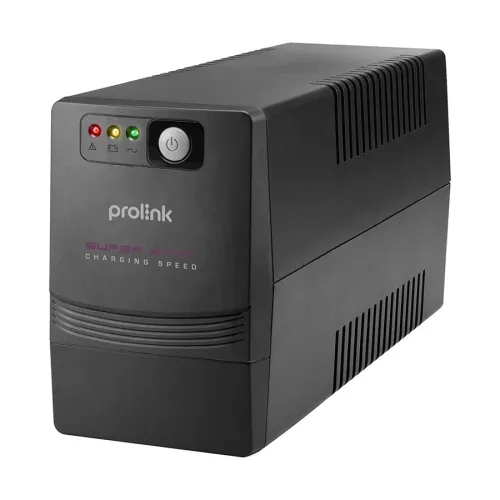
What about line-interactive UPS?
A line-interactive UPS is an improved offline design. It adds automatic voltage regulation (AVR), which can raise or lower the output voltage when the mains voltage sags or rises, without switching to the battery. That saves battery wear when the voltage in your area is unstable but the power has not fully cut.
Many UPS models sold for homes and offices include some form of voltage regulation, and sellers often still call them offline UPS. If your area has frequent low voltage in the evening, look for AVR in the specifications or ask before buying.
How an online (double-conversion) UPS works
An online UPS works differently. It constantly converts the incoming AC power to DC, which charges the battery, and then converts it back to clean AC power through its inverter. Your devices always run from the inverter, never directly from the mains.
Because the inverter is always running, there is no switch when the power fails. The transfer time is effectively zero, and the output stays stable even when the mains voltage and frequency are poor. Online UPS units also produce a pure sine wave output.
Strengths and limits
- Strengths: no transfer gap, the cleanest and most stable power, best protection against voltage problems.
- Limits: costs more, uses more energy, produces more heat and often has a cooling fan running all the time.
- Best for: servers, network racks, banking and office systems that must not go down, medical equipment and sensitive machines.
If you need an online UPS for a server room or a business system, contact the Index IT team with your load details so we can suggest a suitable option.
Online vs offline UPS: comparison table
| Feature | Offline / line-interactive | Online (double-conversion) |
|---|---|---|
| How devices are powered | From mains, switches to battery on failure | Always from the inverter |
| Transfer time | A few milliseconds | Zero |
| Power quality | Mains quality, with AVR on some models | Clean, regulated pure sine wave |
| Efficiency and heat | High efficiency, little heat | Lower efficiency, more heat |
| Noise | Usually quiet | Fan often runs constantly |
| Size and cost | Compact, affordable | Larger, more expensive |
| Best for | Home and office PCs, monitors, CCTV recorders | Servers, network racks, sensitive equipment |
VA vs watts: how to read UPS ratings
UPS models are sold by their VA (volt-ampere) rating, but your devices use power in watts. The two are not the same. The watt rating tells you the real load the UPS can support.
Look at these examples, as listed on Index IT:
| UPS | VA rating | Watt rating |
|---|---|---|
| Power Guard PG650VA-CS | 650VA | 390W |
| ZKTeco ZKUPS-600W-LED | 1000VA | 600W |
| Prolink PRO1201SFCU | 1200VA | 720W |
| ZKTeco ZKUPS-900W-LED | 1500VA | 900W |
Ratings as listed on Index IT in October 2026.
In all of these, the watt rating is about 60% of the VA rating. So never assume a 1000VA UPS can run a 1000W load. Always compare your total load in watts with the UPS watt rating.
How to size a UPS in four steps
- Step 1, list your devices: PC, monitor, router, CCTV recorder, and anything else that must stay on.
- Step 2, find each device's power use in watts: check the label on the adapter or device, or the power supply rating of your PC. The PSU rating is the maximum, and a normal office PC uses much less.
- Step 3, add them up and keep headroom: choose a UPS whose watt rating is comfortably above your total, ideally with 20% to 30% to spare.
- Step 4, decide on backup time: a small load on a big UPS lasts longer. If you need more minutes, choose a larger UPS or one with a bigger battery.
Typical sizing examples
| Setup | Suggested UPS size | Why |
|---|---|---|
| Office desktop and one monitor | 650VA to 1000VA | Enough to save work and shut down safely |
| Home PC, monitor, speakers | 1000VA to 1200VA | More headroom and backup time |
| Gaming PC with a powerful graphics card | 1500VA or above | Gaming PCs draw much more power under load |
| CCTV recorder and camera power supply | 650VA to 1000VA | Low load, longer backup time |
| Router and ONU | Mini DC UPS | Powers them directly for hours |
Backup time: what to expect
A desktop UPS is designed to give you minutes, not hours. Its job is to keep your PC on long enough to save files and shut down, or to bridge a short power cut. For long load-shedding, an IPS or a generator is the right tool for fans and lights, while the UPS protects your electronics.
Backup time depends on the battery size and the load. Manufacturers usually quote it at full and half load. For example, the Power Pac 1200VA Offline UPS lists 30 minutes at full load and 40 minutes at half load, while the Prolink PRO1201SFCU lists up to 15 minutes. Real backup time is shorter as the battery ages.
Ways to get more backup time
- Connect only the devices that really need backup.
- Turn off the monitor and speakers when you only need the PC to finish a task.
- Choose a larger UPS, so the same load is a smaller share of its capacity.
- Replace the battery when backup time drops noticeably.
Keeping your internet on: mini DC UPS for router and ONU
When the power goes, many people find their PC is fine on its UPS, but the internet drops because the router and ONU switch off. A mini DC UPS solves this. It plugs into the wall and powers your router and ONU directly through DC cables, so there is no inverter and very little energy is wasted.
The XTREME XUP63-8.8 Mini DC UPS lists an 8800mAh lithium-ion battery, a maximum load of 17W and outputs of 5V, 9V and 12V DC, plus PoE 15V and 24V. Before buying any mini UPS, check the voltage on your router and ONU adapters and make sure the UPS provides those outputs.

See more options on the mini UPS page.
UPS for CCTV systems
A CCTV system that turns off during a power cut stops recording at the worst possible time. The recorder, the camera power supply (for analog systems) or the PoE switch (for IP systems) and the router should all be on backup power.
CCTV loads are usually small, so an offline UPS in the 650VA to 1000VA range can keep a small system running for a useful length of time. Sudden power loss can also damage recordings and stress the hard disk, so a UPS protects your footage as well as your uptime. For more on this, read our IP vs analog CCTV guide and our CCTV storage guide.
Safety and care tips
- Do not plug in laser printers, heaters, irons or kettles: they draw heavy current and can overload a desktop UPS.
- Keep it ventilated: do not place the UPS inside a closed cabinet or against a wall without airflow.
- Use a proper earthed socket: earthing matters for safety and for surge protection.
- Let it charge: charge a new UPS fully before relying on it.
- Watch the battery: sealed lead-acid batteries wear out over time. When backup time drops sharply or the UPS beeps constantly, the battery likely needs replacing.
- Keep the box and invoice: some brands require them for warranty claims. The Power Guard PG650VA-CS listing, for example, notes that the box is mandatory when claiming.
Final verdict
For most homes and offices in Bangladesh, an offline UPS sized correctly in watts is the right choice for PCs, monitors and CCTV recorders. Add a mini DC UPS for your router and ONU to keep the internet on. Choose an online UPS when you run servers or equipment that must never see a power interruption.
Frequently Asked Questions
Which UPS is best for a home PC, online or offline?
An offline UPS is usually enough for a home PC. It switches to battery in a few milliseconds, which normal PC power supplies handle without problems.
What is the difference between VA and watts on a UPS?
VA is the apparent power rating, and watts is the real load the UPS can support. On the models listed on Index IT, the watt rating is about 60% of the VA rating.
How long will a UPS run my PC?
Desktop UPS units usually give several minutes up to around half an hour, depending on the load and battery. They are meant for saving work and shutting down safely, not for hours of use.
Can I run my router on a UPS?
Yes. A mini DC UPS is the most efficient option for a router and ONU and can keep them running much longer than a desktop UPS.
What is transfer time?
It is the short delay when an offline UPS switches from mains to battery. Online UPS units have no transfer time because devices always run from the inverter.
Is an online UPS worth it for home use?
For most homes, no. It costs more, uses more energy and is designed for equipment that cannot tolerate any interruption.
Can I use an IPS instead of a UPS for my computer?
An IPS is designed for household loads such as fans and lights. A UPS is designed to protect computers and electronics, so use a UPS for your PC.
What size UPS do I need for a gaming PC?
Gaming PCs draw much more power under load. Add up your PC and monitor power in watts and choose a UPS with a watt rating comfortably above that total, often 1500VA or more.
Why does my UPS beep?
Short beeps usually mean it is running on battery. Constant beeping can mean overload or a weak battery. Check the manual for your model.
Should I connect my printer to the UPS?
Inkjet printers draw little power and are usually fine. Laser printers draw heavy current when heating up and should not be connected to a small desktop UPS.

There are no comments for this Article.