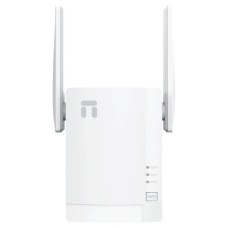
Reliable Wi-Fi Range Extender Price in Bangladesh to Fix Weak Signal and Dead Zones
Looking for the right Wi-Fi range extender price in Bangladesh? A range extender boosts a weak signal to rooms your router cannot reach. At Index IT, we list the Netis E0 N300 Wi-Fi Range Extender at BDT 1,350. It is a simple, low-cost fix for one dead corner. If your signal problem is bigger, see our router price in Bangladesh page.
Not sure which networking device you need? Visit our networking products price in Bangladesh page. This guide explains how extenders work, their price, features, and smart buying tips.
What Is a Wi-Fi Range Extender?
A range extender picks up your router's Wi-Fi signal and sends it again. It sits between the router and the weak area. Devices in that area then connect to the extender.
It is also called a repeater or booster. It does not create new internet. It only stretches your existing signal further.
You plug it into a wall socket and set it up with a phone or PC. Setup takes a few minutes. Most extenders also have a network port and an access point mode.
It is a cheap way to fix one weak spot. It is not a full replacement for a better router or a mesh system.
How a Range Extender Works
The extender connects to your router over Wi-Fi. It then broadcasts a new signal of its own. Your phone joins the extender when you move away from the router.
An extender must sit where it can still receive a strong signal. If you place it in the dead zone, it has nothing good to repeat. Place it halfway between the router and the weak area.
Because it receives and sends on the same band, speed can drop. This is normal for single band extenders. Expect lower speed than next to the router.
For better results, use the network port. Some extenders can connect to the router by cable and act as an access point. That keeps full speed.
Where Are Range Extenders Used?
Extenders suit homes and small offices with a weak corner. They help when walls or floors block the signal.
Common uses include:
- Bedrooms far from the router
- Upper floors in a two-storey home
- Small shops with a back room
- Balconies and rooftops
- Small offices with thick walls
- Study rooms and coaching corners
A student studies in the far room. A shop owner covers a back counter. A family watches TV on the top floor.
Wi-Fi Range Extender Price in Bangladesh: What to Expect
Wi-Fi range extender price in Bangladesh depends on speed, bands, and features. Single band N300 models cost less. Dual band and Wi-Fi 6 models cost more. Prices move with stock and exchange rates.
Here is the extender on our page today. Stock changes often, so call us to confirm before you visit.
| Model |
Type |
Key Feature |
Index IT Price (BDT) |
| Netis E0 N300 |
Wi-Fi range extender |
300 Mbps, 2 external antennas, extender, AP, and WISP modes |
1,350 |
Netis E0 N300 Range Extender Price
The Netis E0 costs BDT 1,350. It offers Wi-Fi speed up to 300 Mbps on the 2.4 GHz band. It has two external 3 dBi antennas. It has one 10/100 Mbps RJ45 port.
It supports three modes: range extender, access point, and WISP. That gives you more than one way to use it. It suits homes and small shops with one weak spot.
Range Extender vs Router vs Mesh
A range extender repeats an existing signal. A router creates the signal. A mesh system uses several units to cover a large space as one network.
An extender is the cheapest fix. It suits one dead zone. A new router suits a signal that is weak everywhere. A mesh system suits large or multi-floor homes.
If your whole home has weak Wi-Fi, check your router first. An old router may be the real problem. A better router can fix more than an extender.
If only one room is weak, an extender is a smart, low-cost choice. Tell us your space and we suggest the right path.
Extender Modes Explained
Many extenders offer more than one mode. The Netis E0 lists three. Each mode suits a different job.
Range extender mode: The device repeats your router's Wi-Fi. This is the common use. Setup is simple.
Access point mode: The device connects to your router by cable. It then makes a new Wi-Fi zone. This keeps better speed.
WISP mode: The device picks up a wireless internet signal and shares it. This helps where an outside wireless service is the source.
Pick the mode that fits your need. If you can run a cable, use access point mode for the best speed.
Best Range Extender Brands in Bangladesh
Brand affects setup, reliability, and support. TP-Link, Tenda, Netis, and Xiaomi are known names here.
Index IT lists Netis today. Netis offers easy setup and low prices. Its extender suits basic home use.
Ask our team if you prefer another brand. Pick one with steady firmware and local support.
Key Features to Check Before You Buy
Do not buy on price alone. Check these points first:
- Speed rating: N300 for basics, AC for dual band
- Bands: Single band or dual band
- Antennas: External antennas help reach
- Network port: For wired devices or AP mode
- Modes: Extender, AP, and WISP
- Setup: Easy app or web setup
- Size: Fits a wall socket without blocking others
Speed rating matters. N300 suits browsing, video calls, and basic streaming. It will not match a fast fiber line. Choose a dual band model for heavy use.
Antennas matter for reach. External antennas can be aimed. Point them upright for a wide spread.
Placement and Setup Tips
Placement decides how well an extender works. Put it about halfway between the router and the weak area. It must still get a good signal from the router.
Keep it away from metal, mirrors, and thick walls. Keep it away from microwave ovens and cordless phones. These cause interference.
Plug it in near the router first. Do the setup there. Then move it to the final spot. Check the signal light and test speed.
Give the extender network a clear name. Use a strong password. Keep the firmware updated when updates come.
Common Extender Problems and Fixes
If the extender drops often, move it closer to the router. A weak link causes drops. Check for interference.
If speed is slow, remember that extenders cut speed. Try access point mode with a cable. Or choose a dual band unit.
If devices will not join, restart the extender and the router. Check the password. Make sure the router is not at its device limit.
If problems stay, tell our team. We can help you check if the router or the extender is the cause.
Best Range Extender for Every User
Match the device to your space. Here is a simple guide.
| User Type |
Recommended Device |
Why It Fits |
| One Weak Room |
N300 range extender |
Low cost, simple |
| Back Room of Shop |
Extender in AP mode |
Better speed with cable |
| Two-Storey Home |
Extender or mesh |
Covers upper floor |
| Whole Home Weak |
Better router or mesh |
Fixes the root cause |
| Large Office |
Wired access points |
Stable speed for many users |
Check your space first. Then pick the device. Do not pay for more than you need.
Extender with Cameras and Other Devices
An extender can help Wi-Fi devices far from the router. It can also feed a wired device through its network port. But do not rely on it for important security cameras.
For stable camera video, use a wired setup. A WiFi camera for home and shop security works best with a strong signal at its spot. Test the signal before you mount it.
For serious camera systems, see our IP camera for wired surveillance range.
For many devices, wired links are better. Use cable where you can. Keep extenders for phones and laptops in weak corners.
Power Cuts and Wi-Fi Uptime
A power cut stops your router and your extender together. No power means no Wi-Fi. Plan backup power.
Use a UPS to keep your router and Wi-Fi running during power cuts. Plug the router and ONU into it. The extender needs power too, so plan for it if possible.
Keep your invoice and original box. Check each product page for warranty details. Update the firmware when updates come.
Why Buy Range Extenders from Index IT?
Index IT is a trusted tech retailer in Bangladesh. We serve homes, shops, and offices across the country. Our team explains each device in simple words.
- Genuine networking products with clear specs
- Updated prices on our category page
- Honest advice on whether you need an extender or a router
- Fast delivery across Bangladesh
- Friendly after-sales support
Need Wi-Fi on a desktop PC? See our WiFi adapter for desktop PCs range.
Want more wired ports? Check our network switch for home and office LAN page.
Planning a wired link? Browse our UTP cable for network wiring range.
Frequently Asked Questions
What is the Wi-Fi range extender price in Bangladesh?
Price depends on speed and features. Index IT lists the Netis E0 N300 range extender at BDT 1,350. Call us to confirm stock.
Where can I buy a Wi-Fi range extender in Bangladesh?
You can buy a genuine range extender at Index IT. We take orders online and deliver across Bangladesh. Call us first to confirm stock.
What does a Wi-Fi range extender do?
It picks up your router's signal and sends it again. That helps weak rooms get a better connection.
Where should I place a range extender?
Place it halfway between the router and the weak area. It must still receive a good signal from the router.
Does an extender reduce internet speed?
Often yes. A single band extender uses the same band to receive and send. Access point mode with a cable keeps better speed.
Can an extender work as an access point?
Yes, some models can. The Netis E0 lists an access point mode. Connect it to the router by cable.
Is an extender better than a new router?
It depends. For one weak room, an extender is cheaper. If the whole home is weak, a better router may help more.
What is the difference between an extender and a mesh system?
An extender repeats a signal as a separate network. Mesh units work together as one network for large spaces.
Can I use an extender for CCTV cameras?
Wired links are better for security cameras. An extender may cause lag. Test the signal before you rely on it.
Do range extenders come with warranty in Bangladesh?
Terms depend on the model. Check the product page for warranty details. Keep your invoice for any claim.
Where Can I Find a Range Extender at the Best Price in BD?
You can find a genuine range extender at Index IT. Check live prices on our category page. Compare speed, bands, and modes. Then call us to confirm stock.
Order online or call our team. Our experts will match the right device to your space and budget.