Handy WiFi Adapter Price in Bangladesh for Desktop PCs and Laptops
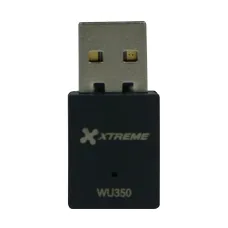
Looking for the right WiFi adapter price in Bangladesh? A WiFi adapter adds wireless internet to a PC that has no built-in Wi-Fi. At Index IT, we list the Xtreme WU350 300Mbps USB Wi-Fi Adapter at BDT 550. It is a small, low-cost way to get a PC online without a cable. If you want to share internet to many devices, see our router price in Bangladesh page.
Not sure which networking device you need? Visit our networking products price in Bangladesh page. This guide explains how adapters work, their price, features, and smart buying tips.
What Is a WiFi Adapter?
A WiFi adapter is a small device that lets a computer join a wireless network. Many desktop PCs have no Wi-Fi inside. An adapter fixes that in seconds.
Most adapters plug into a USB port. You plug it in, install a driver, and pick your Wi-Fi name. Then the PC connects like a phone.
It is also useful for laptops with a broken Wi-Fi card. You can use an adapter instead of opening the laptop.
An adapter does not create internet. It only receives the signal from your router. So your router and internet plan still decide the final speed.
Types of WiFi Adapters
Adapters differ by connection and speed. Know the main types first.
- USB adapters: Plug into a USB port, easy for anyone
- Internal PCIe cards: Fit inside a desktop, often with bigger antennas
- Single band adapters: Use the 2.4 GHz band only
- Dual band adapters: Use both 2.4 GHz and 5 GHz
USB adapters are the easiest choice. They need no tools. Internal cards give better reach but need a desktop with a free slot. Pick by your PC and your budget.
Where Are WiFi Adapters Used?
Adapters help anywhere a PC lacks Wi-Fi. They remove the need for a long network cable.
Common uses include:
- Desktop PCs in homes
- Office computers far from the router
- Study and coaching room PCs
- Old laptops with weak Wi-Fi
- Shop billing computers
- Small offices that cannot run cable
A student connects a desktop in a far room. A shop owner connects a billing PC without drilling walls. A family adds Wi-Fi to an old computer.
WiFi Adapter Price in Bangladesh: What to Expect
WiFi adapter price in Bangladesh depends on speed, bands, and antenna type. Basic single band USB adapters cost less. Dual band and long-range models cost more. Prices move with stock and exchange rates.
Here is the adapter on our page today. Stock changes often, so call us to confirm before you visit.
| Model |
Type |
Key Feature |
Index IT Price (BDT) |
| Xtreme WU350 |
USB Wi-Fi adapter |
300 Mbps, 2.4 GHz, USB 2.0, integrated antenna |
550 |
Xtreme WU350 Price
The Xtreme WU350 costs BDT 550. It is a single band USB Wi-Fi adapter. It offers data rates up to 300 Mbps on the 2.4 GHz band. It uses a USB 2.0 interface and an integrated antenna.
It suits basic browsing, video calls, and light streaming. It is a good choice for a desktop PC in a home or small office.
WiFi Adapter vs Ethernet Cable
A cable gives steady, fast internet. An adapter gives freedom from cables. Each has a place.
If you can run a cable to the PC, cable is more stable. It also has lower delay. For gaming and big downloads, cable is better.
If a cable is hard to run, an adapter is the easy fix. It suits rooms far from the router and rented homes.
You can also mix both. Use an adapter for a far PC and cable for the main computer. Tell us your space and we suggest the best way.
Single Band vs Dual Band
A single band adapter uses only the 2.4 GHz band. This band reaches far but can be crowded. Many homes have many devices on it.
A dual band adapter also uses the 5 GHz band. That band is faster and less crowded. It works best close to the router.
The Xtreme WU350 is single band. It suits light use and longer reach. For fast streaming near the router, choose a dual band adapter.
Check what your router offers. If your router has no 5 GHz band, a dual band adapter gives no extra benefit.
Best WiFi Adapter Brands in Bangladesh
Brand affects driver quality, reliability, and support. TP-Link, Tenda, and Netis are known names here.
Index IT lists the Xtreme WU350 today. Ask our team if you want other brands. Pick one with working drivers for your Windows version.
Key Features to Check Before You Buy
Do not buy on price alone. Check these points first:
- Speed rating: N300 for basics, higher for fast lines
- Bands: Single band or dual band
- Interface: USB 2.0 or USB 3.0
- Antenna: Integrated or external
- Driver support: Works with your Windows version
- Size: Small enough for a laptop port
- Security: Supports WPA2 or newer
Speed rating matters. N300 suits browsing and calls. It will not use a very fast fiber line fully. Match the adapter to your needs.
Driver support matters. Check that the adapter works with your operating system. Install the driver before you use it.
Setup and Placement Tips
Plug the adapter into a USB port at the back of the PC. Back ports give a steadier link. Avoid loose front ports.
Install the driver and restart the PC if asked. Pick your Wi-Fi name and enter the password. Test the speed.
Keep the adapter away from metal cases and thick walls. A USB extension cable can lift it to a better spot. That often improves signal.
Place the PC within a good range of the router. Walls and floors weaken the signal. If the signal is weak, consider a range extender.
Common Problems and Fixes
If the adapter does not connect, reinstall the driver. Restart the PC and the router. Check the Wi-Fi password.
If the signal is weak, move the PC or use a USB extension. Choose a spot closer to the router. Try a different USB port.
If speed is slow, check how many devices share the Wi-Fi. Test the router speed on a phone. Slow internet may come from the line, not the adapter.
If problems stay, tell our team. We can help you find the cause.
Best WiFi Adapter for Every User
Match the device to your need. Here is a simple guide.
| User Type |
Recommended Option |
Why It Fits |
| Home Desktop |
Single band USB adapter |
Low cost, easy setup |
| Streaming PC near Router |
Dual band adapter |
Faster 5 GHz band |
| Far Room PC |
USB adapter with extension |
Better placement |
| Many Wired PCs |
Network switch and cable |
Stable speed |
| Whole Home Weak Wi-Fi |
Better router or extender |
Fixes the root cause |
Check your space first. Then pick the device. Do not pay for more than you need.
When to Choose a Cable Instead
For important PCs, use cable. A cable gives steady speed and no signal drops. Billing and server PCs often need that.
Use a network switch for adding wired ports if your router has too few ports. Run Cat6 cable for the best link.
Use adapters for convenience and cables for stability. Many sites use both.
Power Cuts and Wi-Fi Uptime
A power cut stops your router and PC together. No power means no Wi-Fi. Plan backup power.
Use a UPS to keep your PC and router running during power cuts. It gives time to save work and shut down safely.
Keep your invoice and original box. Check the product page for warranty details. Update the driver when updates come.
Why Buy WiFi Adapters from Index IT?
Index IT is a trusted tech retailer in Bangladesh. We serve homes, shops, and offices across the country. Our team explains each device in simple words.
- Genuine networking products with clear specs
- Updated prices on our category page
- Honest advice on adapters, routers, and extenders
- Fast delivery across Bangladesh
- Friendly after-sales support
Need to boost a weak spot? See our range extender for weak Wi-Fi corners range.
Want a stable wired link? Check our UTP cable for network wiring page.
Want an easy home camera? Browse our WiFi camera for home and shop security range.
Planning a camera network? See our IP camera for network video surveillance page.
Frequently Asked Questions
What is the WiFi adapter price in Bangladesh?
Price depends on speed and features. Index IT lists the Xtreme WU350 USB Wi-Fi adapter at BDT 550. Call us to confirm stock.
Where can I buy a WiFi adapter in Bangladesh?
You can buy a genuine WiFi adapter at Index IT. We take orders online and deliver across Bangladesh. Call us first to confirm stock.
What does a WiFi adapter do?
It lets a PC join a wireless network. You plug it into a USB port and connect to your router.
Do desktop PCs need a WiFi adapter?
Many desktops have no Wi-Fi inside. An adapter adds it. If your PC already has Wi-Fi, you do not need one.
Is a USB adapter as fast as a cable?
Usually not. A cable is steadier and faster. An adapter is easier when a cable is hard to run.
What is the speed of the Xtreme WU350?
It offers data rates up to 300 Mbps on the 2.4 GHz band. Real speed depends on your router and signal.
Do I need to install a driver?
Often yes. Install the driver for your Windows version before use. Follow the setup steps for your device.
Why is my adapter signal weak?
Walls, distance, and metal cases weaken it. Move the PC, use a USB extension, or add a range extender.
Does a WiFi adapter work on a laptop?
Yes. It can help when the laptop's built-in Wi-Fi is weak or broken. Plug it into a USB port.
Do WiFi adapters come with warranty in Bangladesh?
Terms depend on the model. Check the product page for warranty details. Keep your invoice for any claim.
Where Can I Find a WiFi Adapter at the Best Price in BD?
You can find a genuine WiFi adapter at Index IT. Check live prices on our category page. Compare speed, bands, and interface. Then call us to confirm stock.
Order online or call our team. Our experts will match the right adapter to your PC and budget.