
-850x450.png)
How Much Hard Disk Does Your NVR or DVR Need? CCTV Recording Storage Explained
The size of the hard disk in your NVR or DVR decides how many days of footage you can go back and check. Too small, and the recording you need after a theft may already be overwritten. This guide shows you how to calculate storage from your camera count and bitrate, how H.265 and motion recording change the numbers, and which surveillance hard disk to choose.
The quick answer
For a typical home or shop with four 2MP cameras recording around the clock, a 2 TB surveillance hard disk usually gives you roughly three weeks of footage. A 4 TB disk roughly doubles that. If you use 4MP cameras or more cameras, you need more storage for the same number of days.
The exact number depends on the bitrate your recorder uses for each camera, whether you record all the time or only on motion, and the compression format. The rest of this guide shows you how to work it out for your own system.
How CCTV recording uses storage
Every camera sends a continuous stream of video to the recorder. The amount of data in that stream per second is called the bitrate, measured in kilobits per second (Kbps) or megabits per second (Mbps). The higher the bitrate, the more detail is kept, and the more storage each hour of video needs.
The recorder writes all camera streams to its hard disk. When the disk is full, it does not stop recording. It automatically deletes the oldest footage and keeps writing the newest. This is called overwrite or loop recording. So the disk size does not decide whether you record; it decides how far back you can go.
What affects the bitrate
- Resolution: a 4MP stream needs more data than a 2MP stream at the same quality.
- Frame rate: 25 frames per second needs more data than 12 or 15.
- Compression: H.265 needs less data than H.264 for similar quality.
- Scene activity: a busy street or swaying trees produce more data than an empty corridor.
- Night noise: low-light footage can increase the bitrate on some cameras.
The simple storage formula
You only need one number from your recorder: the main stream bitrate for each camera. You can find it in the recorder menu under recording or encoding settings.
86,400 is the number of seconds in a day. Dividing by 8 turns bits into bytes, and dividing by 1,000 turns megabytes into gigabytes.
For example, a camera recording at 2 Mbps uses 2 × 86,400 ÷ 8 ÷ 1,000 = 21.6 GB per day. Four such cameras use about 86.4 GB per day. A 2 TB disk (about 2,000 GB) divided by 86.4 GB gives roughly 23 days of continuous recording.
Real results are a little lower because a formatted disk shows slightly less usable space than its label, and bitrates rise and fall with scene activity. Treat the result as a good estimate, not an exact promise.
Storage table: days of 24/7 recording
The table below uses the formula above for continuous recording. Find your bitrate and camera count to see how many days each disk size gives you.
| Bitrate per camera | Per camera per day | 4 cameras on 2 TB | 4 cameras on 4 TB | 8 cameras on 4 TB | 8 cameras on 8 TB |
|---|---|---|---|---|---|
| 1 Mbps | 10.8 GB | About 46 days | About 92 days | About 46 days | About 92 days |
| 2 Mbps | 21.6 GB | About 23 days | About 46 days | About 23 days | About 46 days |
| 4 Mbps | 43.2 GB | About 11 days | About 23 days | About 11 days | About 23 days |
| 6 Mbps | 64.8 GB | About 7 days | About 15 days | About 7 days | About 15 days |
Estimates for continuous recording, calculated with decimal units (1 TB = 1,000 GB). Actual results vary with scene activity and recorder settings.
As a rough guide, 2MP cameras on H.265 are often set somewhere around 1 to 2 Mbps, while 4MP cameras are often set higher. Always check the actual setting on your own recorder, because installers and default profiles differ.
How H.265 and smart codecs save space
H.264 has been the standard video compression for years. H.265 (also called HEVC) is newer and can deliver similar picture quality at a noticeably lower bitrate, which means more days of footage on the same disk.
Brands add their own improvements on top. Hikvision lists H.265+ on many NVRs and H.265 Pro+ on its Turbo HD DVRs. These smart codecs lower the bitrate further in scenes where little is moving, such as an empty shop at night.
For example, the Hikvision DS-7104HGHI-K1 4 Channel DVR lists H.265 Pro+/H.265 Pro/H.265/H.264+/H.264 compression, and the Hikvision DS-7608NI-Q1 8 Channel NVR lists H.265+, H.265, H.264+ and H.264 decoding.
Check that the camera supports it too
For IP systems, the camera does the compression. Make sure both the camera and the NVR support H.265 and that it is turned on in the camera settings. For analog systems, the DVR does the compression, so the DVR setting is what matters.
Continuous recording vs motion recording
Continuous recording saves everything, all day. Motion or event recording saves footage only when the camera or recorder detects movement, which can stretch your storage a long way.
Continuous (24/7)
Nothing is missed, and it is easy to search by time. Uses the most storage. Best for shop counters, cash areas and main entrances.
Motion or event
Uses far less storage in quiet areas. Can miss the start of an event if detection is poorly set. Best for corridors, stores and rooms that are empty for long periods.
Many recorders let you combine both: continuous recording on important cameras and motion recording on the rest. Smart detection of people and vehicles, such as Hikvision AcuSense on selected models like the Hikvision iDS-7108HQHI-M1-S AcuSense DVR, reduces false triggers from rain, shadows and moving leaves.
If you rely on motion recording, test it at night and during rain, so you know it records what you need.
Check your recorder's hard disk limits
Before buying a large disk, check two specifications on your NVR or DVR: the number of SATA bays and the maximum capacity per disk.
| Recorder | Channels | Hard disk support (as listed) |
|---|---|---|
| Hikvision DS-7104NI-Q1/M NVR | 4 IP | 1 SATA, up to 6 TB per disk |
| Hikvision DS-7608NI-Q1 NVR | 8 IP | 1 SATA, up to 8 TB per disk |
| Hikvision DS-7608NI-Q2 NVR | 8 IP | 2 SATA, up to 8 TB per disk |
| Hikvision iDS-7116HQHI-M1/S DVR | 16 analog | 1 SATA |
Specifications as listed on Index IT in October 2026. Check the product page for full details.
A recorder with two bays gives you more total storage and lets you add a second disk later instead of replacing the first. Some recorders can also be set to store copies on a second disk for extra safety.
Why you should use a surveillance hard disk
A normal desktop hard disk is designed for a PC that reads and writes data in short bursts and is turned off at night. A CCTV recorder writes several video streams at the same time, around the clock. Surveillance drives are built for that job, with firmware tuned for continuous writing from many streams.
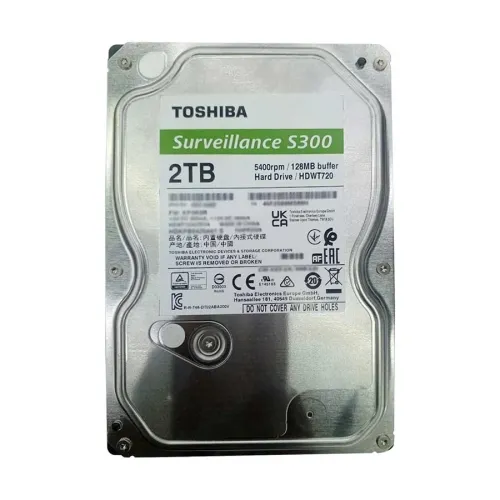
The Toshiba S300 2TB Surveillance Hard Drive lists support for up to 32 cameras, use in systems with 1 to 8 drive bays, a 5400 RPM speed, a 128 MB buffer and a 3-year warranty. Western Digital's Purple range is another well-known surveillance drive family.
What to look for
- Surveillance rating: the drive should be marketed for CCTV or video recording.
- Supported cameras and bays: make sure the drive is rated for your camera count.
- 3.5 inch SATA: the standard size and connection for most NVRs and DVRs.
- Warranty: keep the box and invoice, as you will need them for a claim.
Browse drives on the hard disk drive page.
Worked examples
Flat with 4 cameras
Four 2MP cameras on H.265, recording continuously at about 2 Mbps each, use about 86 GB per day. A 2 TB surveillance disk gives roughly three weeks. If you want a month or more, choose a larger disk or switch the quieter cameras to motion recording.
Shop with 8 cameras
Eight cameras with a mix of 2MP and 4MP, averaging around 3 Mbps each, use roughly 260 GB per day. A 4 TB disk gives about two weeks. For a month, use a two-bay NVR such as the DS-7608NI-Q2 with two disks.
Office with 16 cameras
Sixteen cameras need careful planning. Use continuous recording on entrances and cash areas, motion recording elsewhere, and choose a recorder with enough bays for the total storage you need.
Keeping your footage safe
- Protect against power cuts: sudden shutdowns can damage recordings and stress the hard disk. Connect the recorder to a UPS.
- Keep the recorder cool: place it in a ventilated spot, not inside a closed cabinet in a hot room.
- Check the disk status: look at the hard disk health in the recorder menu every month.
- Export important clips quickly: after an incident, save the footage to a USB drive or phone before it is overwritten.
- Secure the recorder: a thief who takes the recorder takes the evidence. Mount it out of sight or in a locked box.
Common storage mistakes
- Buying the disk before checking the recorder's maximum supported capacity.
- Using a desktop hard disk for 24/7 recording.
- Recording every camera at maximum quality when a lower setting would be enough for that area.
- Leaving H.265 turned off.
- Never checking how many days the system actually keeps.
- Waiting too long to export footage after an incident.
Final word
Start with the number of days you want to keep, then work out the storage from your cameras' bitrate. Turn on H.265, use motion recording where it makes sense, choose a surveillance-rated hard disk and check your recorder's limits before you buy. If you are still deciding between camera systems, read our IP camera vs analog CCTV guide.
Frequently Asked Questions
How many days of recording does 1 TB give?
It depends on the bitrate and camera count. One camera at 2 Mbps uses about 21.6 GB per day, so 1 TB holds roughly 46 days for one camera or about 11 days for four cameras recording continuously.
What happens when the CCTV hard disk is full?
Most recorders overwrite the oldest footage automatically and keep recording. You only lose the oldest days, not new recordings.
Can I use a normal hard disk in a DVR or NVR?
It may work, but surveillance drives are designed for continuous 24/7 recording from many cameras and are the better choice.
Does H.265 really save storage?
Yes. H.265 needs a lower bitrate than H.264 for similar quality, so the same disk holds more days of footage.
Is motion recording better than continuous recording?
It saves storage, but it can miss events if detection is not set correctly. Use continuous recording for important areas and motion recording for quiet ones.
How do I find my camera's bitrate?
Open the recorder menu and look under recording, encoding or video settings for the main stream bitrate of each camera.
Can I add a second hard disk later?
Yes, if your recorder has more than one SATA bay. The DS-7608NI-Q2, for example, lists two SATA interfaces.
Do 4MP cameras need more storage than 2MP?
Usually yes, because they record more detail at a higher bitrate. Plan more storage when you choose higher resolution cameras.
How long should a shop keep CCTV footage?
Many shops aim for at least two to four weeks, so there is time to notice a problem and check the footage.
Does load-shedding damage the CCTV hard disk?
Frequent sudden power loss can corrupt recordings and stress the disk. A UPS for the recorder is strongly recommended.

There are no comments for this Article.